MSP Management Automate your best practices
Rules that handle routine work, from simple ticket routing to complex billing.
- 14-day free trial
- No credit card
- No lock-ins
- From $99/user/mo
Routine work, handled
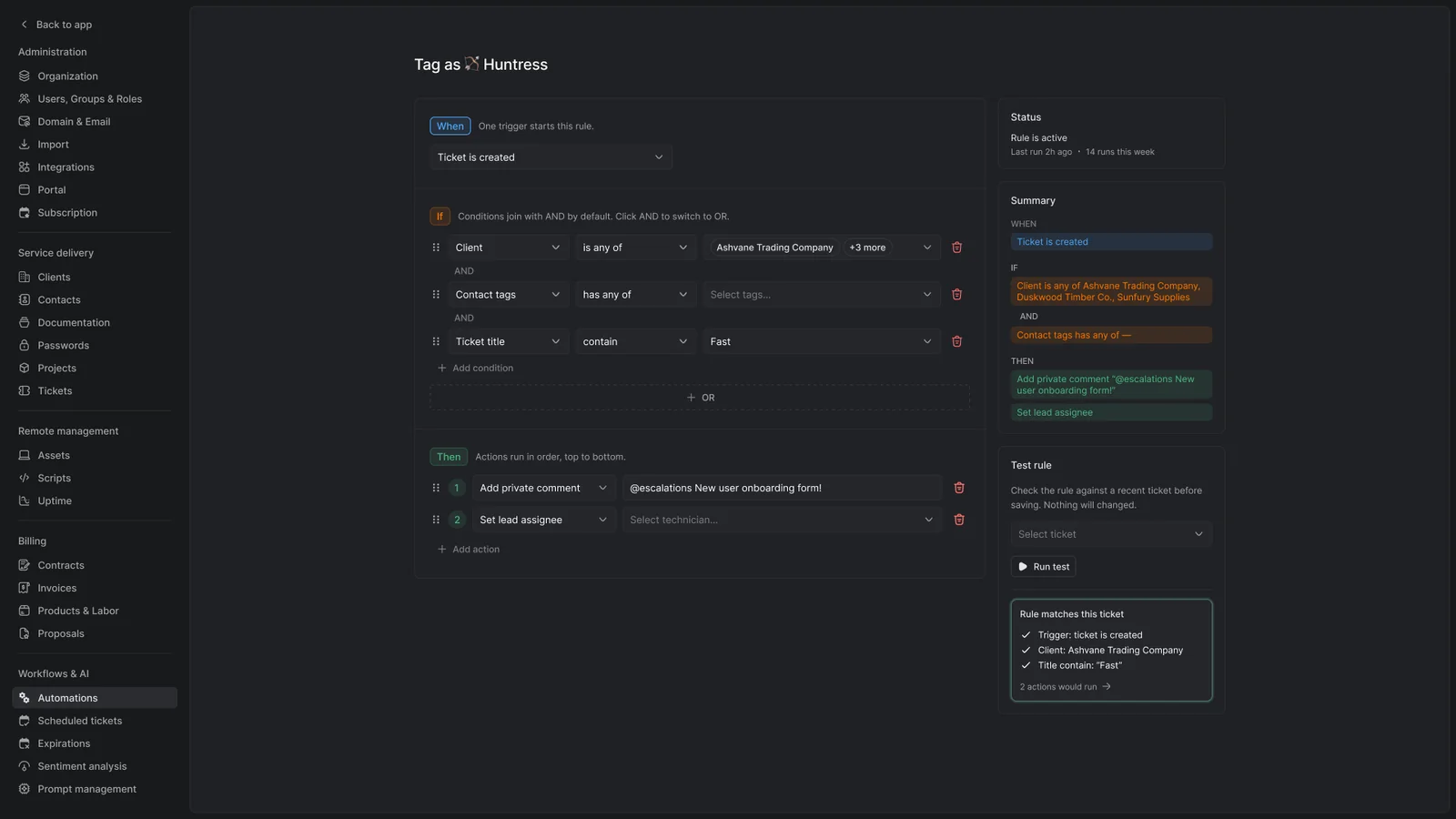
Triggers, conditions and actions take repetitive tasks off your team.
Workflows
Triggers, conditions and actions you define.
- Event and time triggers
- Conditions on ticket title, contacts, groups and business hours
- Actions that assign tickets, create checklists, set priority, add tags and more
- Recurring tickets on a schedule
- Multiple actions chained together
Billing automation
Catch billable work before it's missed.
- Dynamic quantities that track your assets
- Pax8 and CIPP integrations that automate Microsoft 365 billing
- Rules that catch missed billing
Shortcuts and templates
Common tasks in fewer clicks.
- Ticket Shortcuts for one-click workflows
- Scripts using custom fields and variables
- Dynamic ticket templates
- Canned responses
- Pinned shortcuts
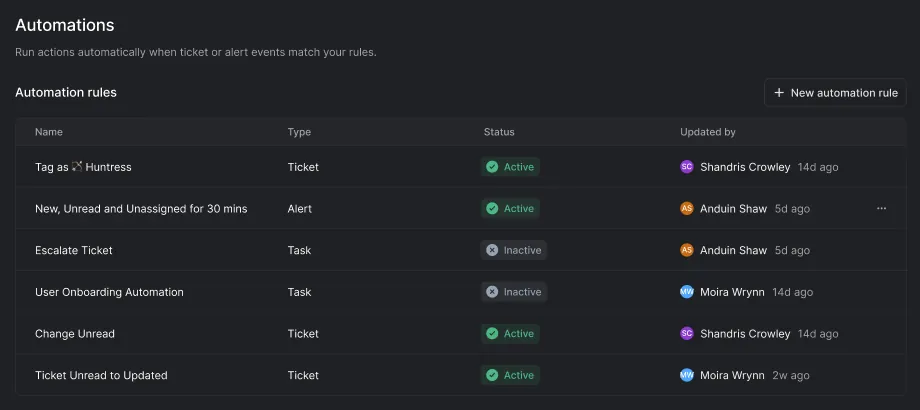
Every rule, in one place
Run actions automatically when ticket or alert events match your rules, and see who changed each rule and when.
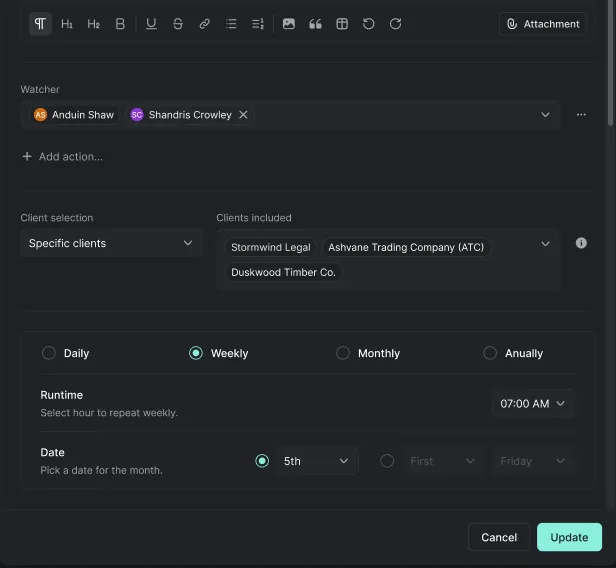
Recurring work, on schedule
Recurring work created daily, weekly or monthly with the group and actions preset.
The admin work, done before you open the ticket
Not a chatbot bolted to the sidebar. These run against your queue as tickets arrive, and you keep control of the prompts.
Triage
Automatic ticket types
The most relevant type assigned from the subject and first inbound comment.
Triage
Automatic tagging
Up to three tags applied on arrival, so nobody tags by hand.
Escalation
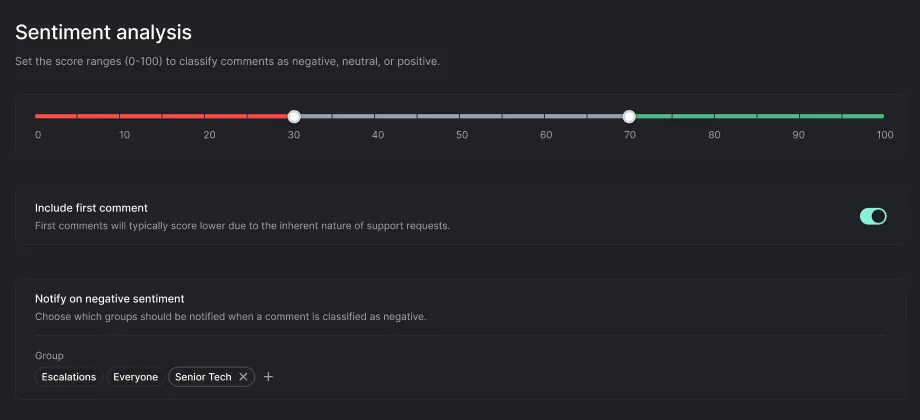
Sentiment analysis
Inbound comments scored for negativity, with a group notified when it crosses your threshold.
Catch-up
Ticket summary
A concise rundown of a long timeline, so a reassignment doesn't mean reading forty comments.
Replies
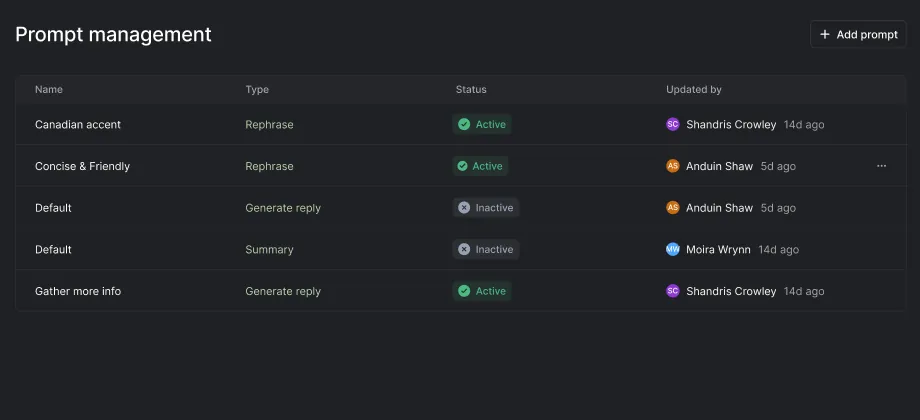
Prompt management
Build your own prompts to draft or rephrase replies. Your tone, not a vendor's.
Rules
Event and time automation
Assign, notify or act on ticket creation, status changes and unread state.
Rules
Expiration alerts
Domains, warranties and contracts raise alerts at thresholds you set.
Rules
Scheduled tickets
Recurring work created daily, weekly or monthly with the group and actions preset.
Shortcuts
One-click workflows
Canned responses, solve-and-close, and project baselines from a single action.
What MSPs want to know
What can an automation rule do in Gorelo?
Assign, tag, notify and update tickets for you. Each rule has one trigger, such as a ticket being created, its status changing or it going unread, then conditions like title, contacts, groups or business hours, then actions that run in order, such as setting the lead assignee, adding a tag or posting a private comment.
Can a rule act when a client replies to a ticket?
Yes. A client reply marks the ticket unread, so a rule on the Ticket is unread trigger can change its status or notify the assignee. Rules only act on events that happen after you turn them on, and time conditions count calendar hours, not business hours.
How do we create recurring tickets for maintenance and checks?
With scheduled tickets. Set the title, group, description and actions such as assignees, checklists and tags, pick the clients (or all of them), and choose a daily, weekly or monthly schedule. Tickets are created at the time you set, in your organization’s time zone.
Can Gorelo warn us before domains, warranties and contracts expire?
Yes. An expiration rule raises alerts at the number of days before expiry you choose, and you can add more than one threshold. Rules can include or exclude clients, and warranty rules can be limited to a hardware type.
Can a ticket be solved, then closed later if the client doesn’t reply?
Yes, with a ticket shortcut. One click marks the ticket Solved and drafts a public comment, then a wait step closes it after the time you set, such as 72 hours. If you turn on “Remove below actions when public comment is received”, a public reply from the client cancels the close.
What does Gorelo AI do to new tickets?
It can set the ticket type and apply up to three tags, chosen from the types and tags you select, based on the subject and first inbound comment. Sentiment analysis scores inbound comments from 1 to 100 and notifies the groups you pick when one falls below your threshold.
Is automation included in every plan?
Yes. AI & Automation is included in Full Platform Access and in both flexible licenses. See pricing.
Customer story
“Gorelo has significantly streamlined our managed offering by automating routine tasks, integrating our operations, and improving overall efficiency.”
Explore the platform
All-in-one platform, one login, one record behind all of them.
Ticketing (PSA)
Tickets, forms and a client portal, connecting you and your clients.
Learn moreRemote Management (RMM)
Monitor every system and device, and manage all of it remotely.
Learn moreDocumentation
Client docs and passwords, organized and ready when you need them.
Learn moreBilling
Invoices, bundles and contracts, with missed billable work flagged for you.
Learn moreAutomation
Rules, schedules and shortcuts that take routine work off your team.
You're hereProjects
Multi-step client work with tasks, timelines, checklists and time tracking.
Learn moreGorelo AI
Technician-first AI across tickets, devices and docs. It does the legwork, and your techs make the call.
Learn moreRun your MSP on Gorelo
Try it on your own clients and devices, free for 14 days.
- 14-day free trial
- No credit card
- No lock-ins
- From $99/user/mo